
Transitions Report
Learn how to use Matomo’s Transitions report to understand how users arrive at a page, what they click next, and how to identify internal navigation and external link clicks from a specific page.
The Transitions report shows what visitors did immediately before and after viewing a specific page. It provides context around a single page by showing how users arrived and what actions they took next, including navigation to other pages, external link clicks, downloads, searches, and exits.
Unlike path-based reports, Transitions focuses on a single page at a time, making it easier to understand how that page functions within the user journey.
How to Open the Transitions Report
You can launch the Transitions report from the Pages, Page Titles or go directly to the Transitions reports.
Steps
- Go to Behavior → Pages or Behavior → Page Titles
- Locate the page you want to analyze
- Hover over the row in the table
- Click the Transitions icon

The report that is shown contains data for the period you selected in the normal date picker.
Understanding the Page Transitions Report
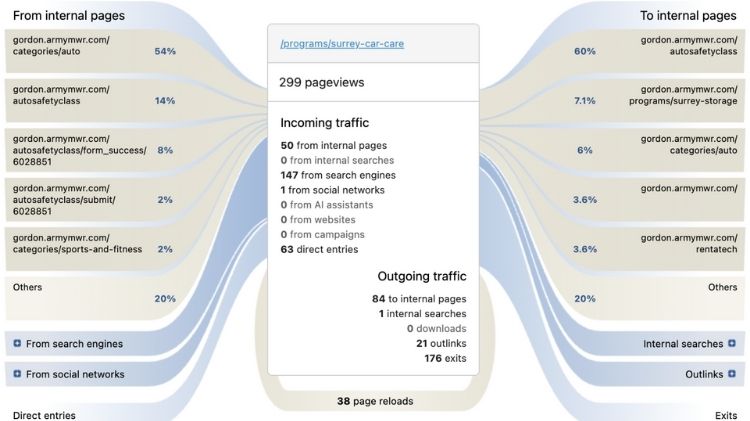
Left Side: Incoming Traffic
This section shows what users did immediately before viewing the page.
- From Internal Pages: Users navigated from another page on the same site.
- From Search Engines: Users arrived directly from external search engines.
- From Websites: Users clicked a link on another website.
- From Campaigns: Users arrived via tracked campaigns.
- From Internal Searches: Users searched on your site and clicked through.
- Direct Entries: Visits that started on this page (landing pages).
Each connection’s thickness and % represents the relative amount of traffic.
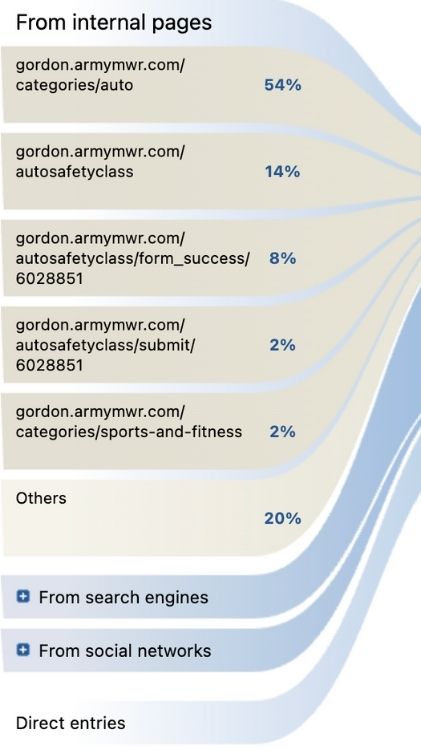
Center: Page Overview
The center of the report shows summary statistics for the selected page:
- Pageviews – Total number of times the page was viewed
- Page reloads – Number of consecutive reloads of the same page
- Hovering over values shows their share of total traffic
The center box represents the page you are analyzing.
Right Side: Outgoing Traffic
This section shows what users did immediately after viewing the page.
- To Internal Pages: Users continued to another page on the site.
- Internal Searches: Users started a site search from the page.
- Downloads: Users clicked a tracked download link.
- Outlinks: Users clicked an external link.
- Exits: The visit ended on this page.
- Page Reloads: The page was reloaded consecutively.
Interacting with the Transitions Report
- Click a group label or its connecting line to expand or collapse details
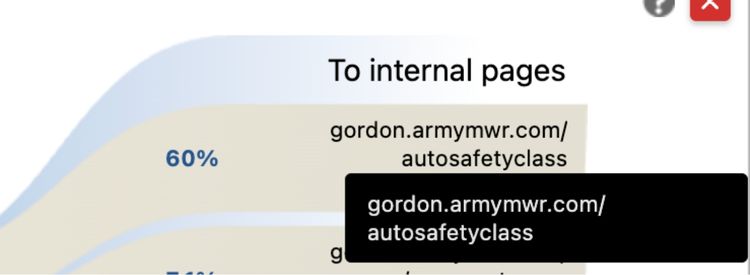
- Hover over elements to see tooltips with percentages and counts
- Click an internal page to reload Transitions for that page
Why Transitions Is Different
Transitions is not a click path report. It shows everything that happened immediately before and after a page, including non-pageview actions like outlinks and exits. This context is difficult to obtain in many other analytics tools.
Use Case: Surrey Car Care Page
Page analyzed:
/programs/surrey-car-care
Goal:
Understand how users reach the Surrey Car Care page and whether they click the external auto repair shop link embedded in the page content.
How Users Arrive at Surrey Car Care
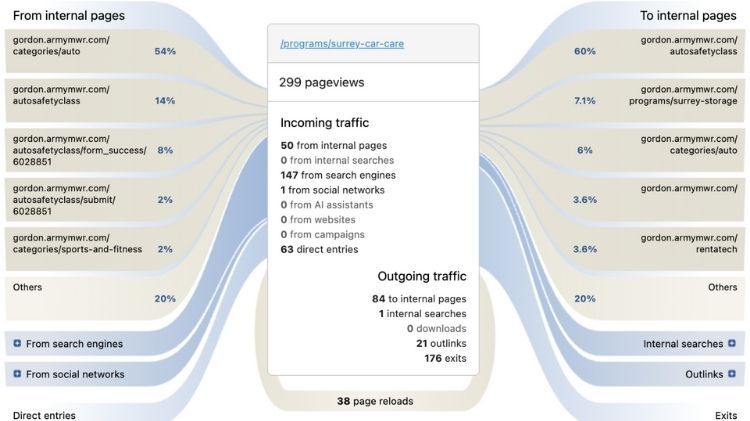
- Most users come from internal pages, especially:
- /categories/auto
- /autosafetyclass
- A significant portion arrive from search engines, indicating organic search visibility
- Some users enter the page directly, making it a landing page
This tells analysts the page is discoverable both through site navigation and search.
What Users Do Next
- Many users continue to related internal pages, such as:
- Auto Safety Class
- Surrey Storage
- Auto category pages
- Outlinks are recorded, which include clicks on the external auto repair shop link
- Some visits end on this page, which may indicate:
- Task completion
- External site visits
- Natural session endings
Why This Matters for Analysts
- Using Transitions, an analyst can:
- Verify that embedded links are being clicked
- Identify which pages drive traffic to Surrey Car Care
- Understand whether users continue exploring or exit
- Confirm that content-based promotions are working,even outside standard ad placements
If the question is:
Question:
Do users click the Auto Safety Class link from the Surrey Car Care page?
Answer:
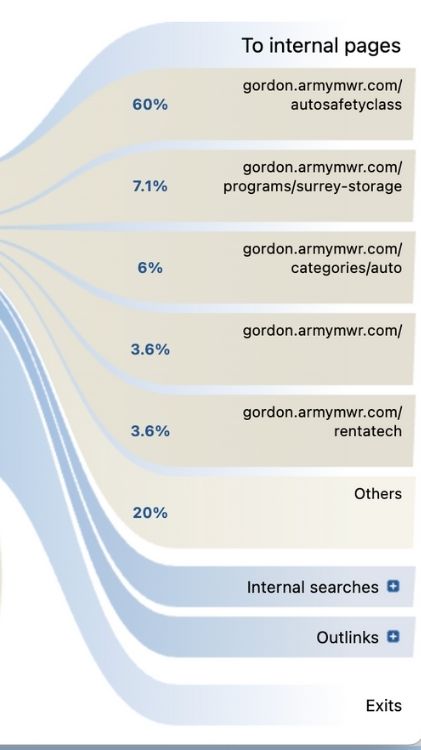
Yes. The majority of users who continue navigating after viewing the Surrey Car Care page click through to the Auto Safety Class page.
Key Findings
- 60% of users who navigated to another page clicked the Auto Safety Class link
- This makes Auto Safety Class the top next action taken from the Surrey Car Care page
- Other internal destinations account for much smaller shares of traffic, indicating a strong, intentional user path
Learn how to use Matomo’s Transitions report to understand how users arrive at a page, what they click next, and how to identify internal navigation and external link clicks from a specific page.