
View Video Events in GA4
Google Analytics 4 (GA4) tracks videos using an event-driven model, where each user interaction with the video player is logged as an event. GA4 can track various video-related events, such as video plays, pauses, seeked positions, and completed views. It can capture data such as video duration, volume, and playback rate.
To view video events in GA4, you can follow these steps:
- Sign in to your GA4 account.
- In the left-hand menu, click on "Events" under the "Engagement" section.
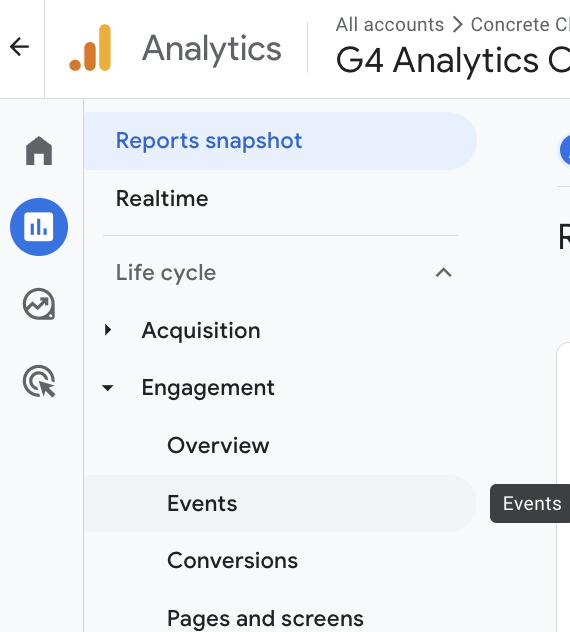
- This will take you to the "Events Overview" report, where you can view high-level data about your events.
- To view video-related events, click on the "Video" link in the list of events. This will show you a list of video-related events that have been tracked in GA4.
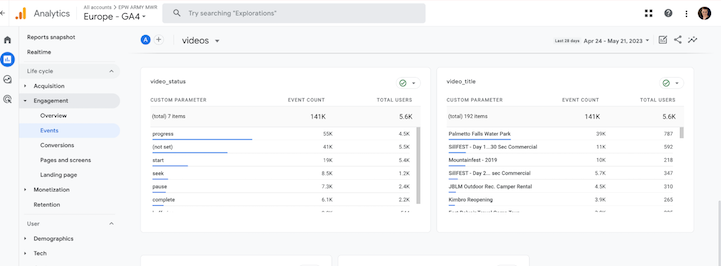
- To view more detailed information about a specific event, click on the event name. This will take you to the "Event detail" report, where you can see data such as the total number of events, unique events, and event parameters.
- To further analyze your video data, you can use the various filters and dimensions available, such as "Video ID" or "Video duration".
Results
By tracking video events in GA4, you can gain insights into how users are interacting with your video content and identify opportunities to optimize the user experience and improve engagement.

GA4 FAQ
Q: What is Google Analytics 4? A: Google Analytics 4 (GA4) is Google's latest analytics platform, designed to provide advanced insights and measurement capabilities for businesses and organizations. Q: What are...